Parking
When ATC asks you to "say parking", the window shows what you can answer. It also comes up on its own when you land or switch to Ground.
When the card comes up
- When ATC asks "say parking". ATC asks in two places: Approach, at an airport with a large number of airline gates (once, on the check-in or with the approach clearance), and Ground, on your first call after landing when no parking is known (once per taxi-in).
- When you land. Once you have landed at your destination and slowed to 30 kt or less, the card comes up without being asked. Tower's runway exit does not have to come first, and an airport with no tower works the same way.
- When you switch to Ground. The card also comes up when the radio you transmit on is tuned to the destination's Ground and is on and listening.
The card comes up once per landing, at whichever of the last two comes first. It does not come up on its own when your parking is already known (you named it), when a card is already up, when it already came up for this landing, or when the airport has no stands. A go-around followed by a new landing is a new landing; a bounce is not.
The Parking card comes to the front of the card slot, titled with the airport, such as "Parking at KPDX". When it came up on its own, a line under the title says "Pick your parking, then tell Ground", and the log says "Landed" or "Switched to Ground" instead of naming a controller who asked. If you close it, it stays closed for that landing; ATC's "say parking" still brings it back.
Needs client 0.20
The card's own line, the log's wording and a closed card staying closed come with client 0.20, which is still a prerelease (the stable release is 0.19.0). On client 0.19.0 the card does not know why it came up: the card appears on landing and on the switch to Ground all the same, but with no line under its title, and the log says that ATC asked for your parking when it did not.
What you can say
- Gates and stands, by the names your own scenery gives them, grouped by kind: airline gates, general aviation, cargo, military and the rest. A long group is split into sections by name. An airport with 30 or more stands gets a search box ("Search gates and stands"); it matches every word you type, in any order, so "a 1" finds A1. A very long list says how many more stands are not listed and that you can still say them.
Tap one and the card copies the words to say: "parking gate A1" for a gate, "parking Atlantic Aviation 2" for a named stand. Then say them on the radio. Picking something in the window sends nothing to ATC: you still ask by voice.
The card goes away once ATC has your parking, when the flight ends, or with Close.
The parking map
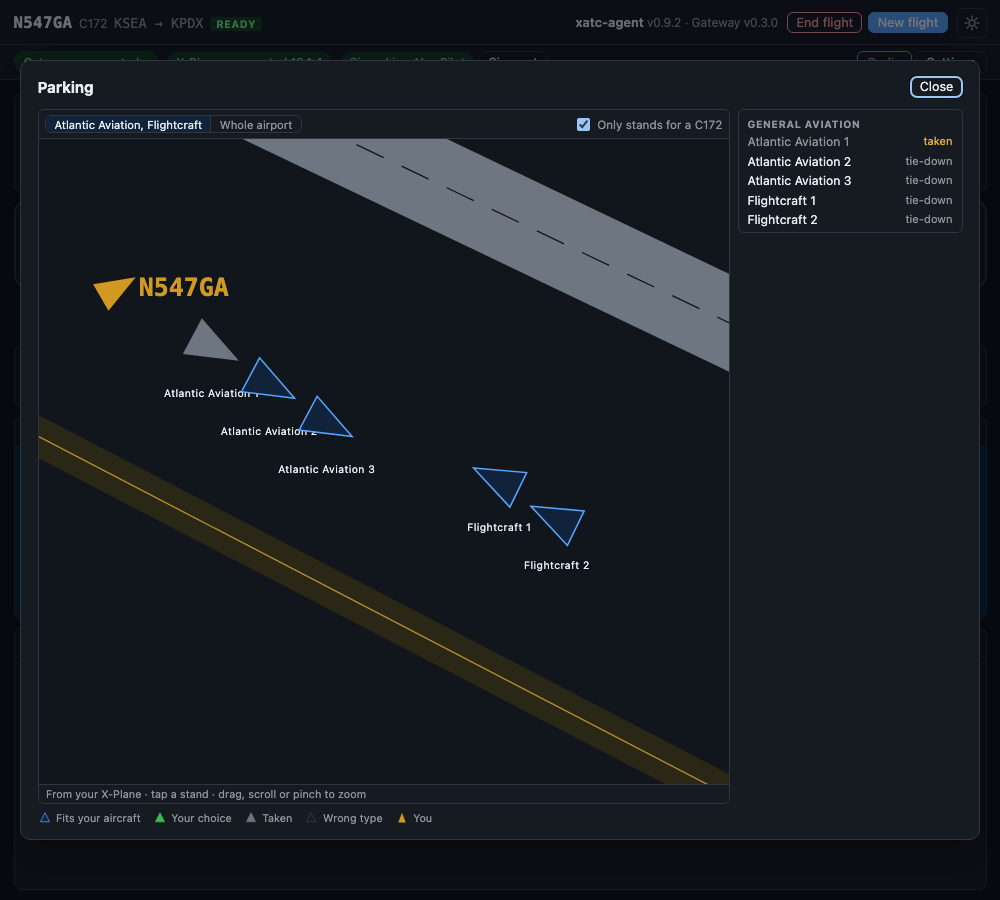
The parking map, opened full size, on demo scenery: the stands that fit a C172, one of them taken, and your own aircraft taxiing in.
Above the lists, the card draws your destination from your own X-Plane scenery:
- the runways with their numbers and the taxiways with their letters,
- every stand as an arrow pointing the way the nose goes,
- your aircraft, when you are at or near the airport.
Stands that take your kind of aircraft (piston, turboprop, jet or heavy jet, as the scenery lists them) are blue. A legend under the map explains the marks: Fits your aircraft, Your choice, Taken, Wrong type and You. Only stands for your type (such as "Only stands for a C172"), on by default, hides the others. If the client does not know your aircraft type it shows every stand and says so. A stand that another aircraft in your X-Plane is sitting on is grey and says taken. You can still pick it, and ATC may tell you it is occupied.
Drag, scroll or pinch to zoom; stand names appear once you are zoomed in. The buttons above the map jump to the ramps that have stands for you. Bigger map opens it in the full window.
Tap a stand, on the map or in the list, and the card shows its name, its kind, whether it is free, and the words to say, with Copy the words.
Everything on the map comes from the X-Plane files on your PC and works offline. If the map cannot be read, the card says "No map" and why, and the lists still work.
What Ground does with it
- A parking you name is where the taxi-in ends: a gate or a stand by its name, or a ramp ("Central Ramp" is the stand of that ramp nearest you).
- Name nothing and Ground asks "say parking" once. If you still name nothing, it taxis you to a general parking and says which. Ground never picks a gate for you.
- If Ground cannot find what you named, it says so and taxis you to a general parking, named.