The approach plan
When ATC vectors you for an approach, you fly one heading at a time. The window shows you the whole plan: where ATC means to take you, and where you are on it.
The confirmation in the header
While ATC has you on an approach, the top line of the window says so, beside your callsign:
| You see | It means |
|---|---|
| ILS · RWY 10R · ATC is vectoring you (blue) | ATC has a plan for you and is calling each turn. You do not need to ask for vectors |
| ILS · RWY 10R · cleared for the approach (green) | ATC has cleared you for the approach |
The badge is the kind of approach: ILS, RNAV, Visual, or another kind by its name, such as LOC.
It shows in both views, whatever card is in the card slot.
The Approach card
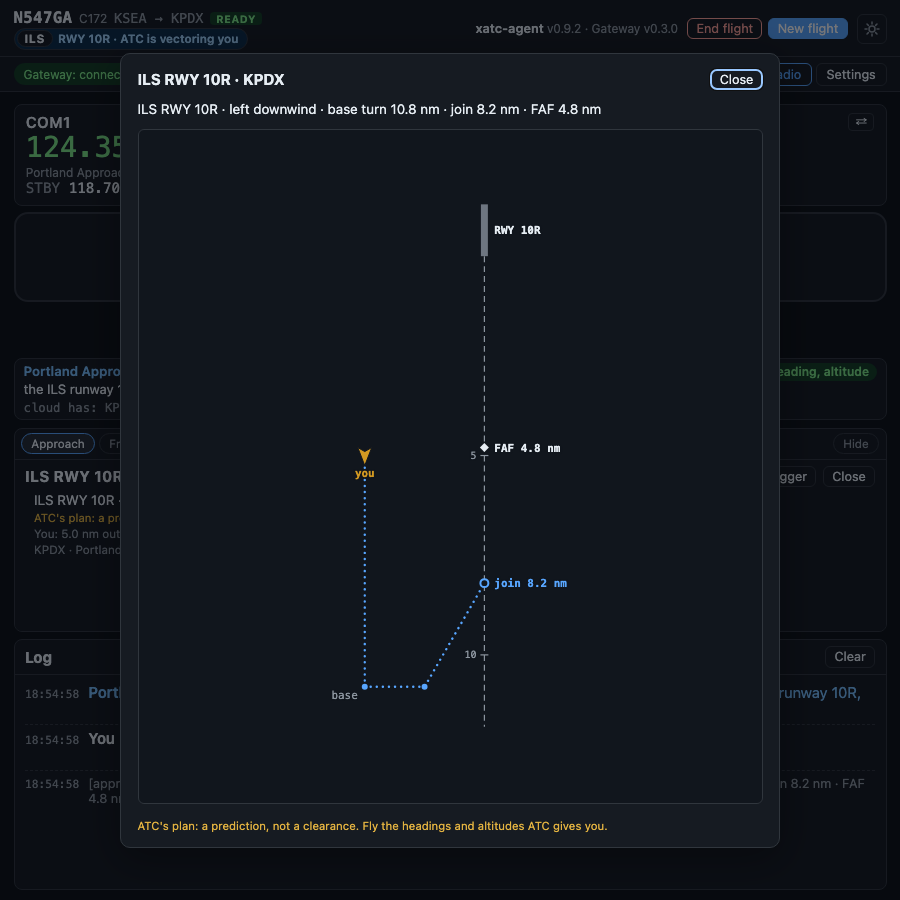
ATC's plan for a vectored ILS, full size: a left downwind, the base turn at 10.8 nm, joining the final at 8.2 nm, outside the final approach fix.
The diagram is drawn course up: the runway is at the top and the final approach course runs down the page.
- The runway and the extended centerline, with a tick every 5 nm.
- The final approach fix, with its name (when the data has one) and its distance from the runway.
- Where you join the final, with its distance.
- The path ATC plans, as a dotted line: the downwind, the base turn, the turn to final.
- Your aircraft, turned to its heading.
Beside the diagram:
- the plan in one line: "ILS RWY 10R · left downwind · base turn 10.8 nm · join 8.2 nm · FAF 4.8 nm" (once ATC has cleared you, the pattern part is dropped),
- where you are: "You: 5.0 nm out, 3.0 nm left of the final",
- the airport, the controller and your assigned altitude,
- the badge: vectors, then cleared.
A prediction, not a clearance
The card shows ATC's plan. It changes as ATC changes it. Fly the headings and altitudes ATC gives you on the radio, not the picture.
Reading it
- Far from the airport, your aircraft sits at the edge of the diagram with its distance, and an arrow points to where it really is. The plan stays large enough to read.
- Without X-Plane connected, the plan still shows, and the card says your position is not known.
- As you fly the pattern, the parts behind you drop off, and the dotted line always starts at your aircraft.
Bigger
The card slot is small. Bigger opens the diagram in the full window, and Close, Esc or a click outside it closes it again.
If the window is too short for the card's diagram to be readable, the full-size diagram opens by itself when ATC's plan starts. It does so once per approach: after you close it, ATC's updates do not bring it back. Holding Space still transmits while it is open.
Turning it off
- Close on the card hides it until ATC makes a new plan.
- Settings > Appearance > Show the Approach card turns the card off for good. The confirmation in the header stays.